Why Your Company's New Productivity Tool Isn’t Working (and How to Fix It)

Updated: May 2, 2025

Many small and mid-sized agencies eagerly adopt productivity platforms like ClickUp, Asana, or Monday.com expecting instant efficiency gains. Yet it’s common to find that after the initial implementation, productivity remains flat or even declines. If your shiny new productivity tool isn’t working to deliver the ROI you hoped for, you’re not alone – and there are concrete reasons (and solutions) for this outcome.
Common Reasons a Productivity Tool Isn't Working
Low Team Adoption
Simply rolling out a tool doesn’t mean your team will use it effectively. In many cases, employees revert to old habits (email threads, spreadsheets) or only use a fraction of the tool’s features. The result? The software you invested in becomes “shelfware.” In fact, almost half of all installed software licenses go entirely unused by employees.
Nearly half of software licenses are unused, wasting $44M+ per month, which means no matter how powerful the platform, it’s not helping if people aren’t actually embracing it. Often this stems from insufficient onboarding, lack of buy-in, or just change resistance. As one IT consulting report put it, organizations end up “with a solution that they had thrown a ton of time and money into, and that wasn’t bringing them any closer to the results they were hoping to achieve.” In short, adoption matters as much as implementation – a theme we’ll explore more below.
Poor Integration & Data Siloes:
Another reason productivity stalls is that the new tool isn’t well-integrated with your team’s existing workflows or tech stack. If your project management app doesn’t talk to your calendar, CRM, or file storage, people will spend time manually transferring information or checking multiple places for updates. This “app overload” creates friction instead of efficiency. A 2023 Gartner survey found 40% of workers must use over 11 different apps to get their work done, and over one-third reported missing important updates due to juggling too many tools and information sources.
When systems are fragmented, your shiny new platform can just add to the noise instead of streamlining it. Team members end up searching for data across numerous apps, wasting valuable time. (One study showed employees spend 3.6 hours a day just searching for information, with 58% blaming having too many different data sources! Without integration, the productivity tool might improve one corner of your process but create new inefficiencies elsewhere.
Ineffective Workflow Design:
A software tool is only as good as the process it supports. If you layer a fancy platform on top of a broken or clunky workflow, you often just speed up the chaos. Microsoft’s Bill Gates famously cautioned, “automation applied to an inefficient operation will magnify the inefficiency.” In practice, this means if your task intake, approval flows, or communication processes were unclear to begin with, a new app won’t magically fix them – it might even expose more problems.
Many agencies fall into the trap of adapting their work to fit the tool (or using default settings) rather than customizing the tool to optimize the work. The result is that employees feel the software is cumbersome or creates duplicate work. For example, if a team isn’t sure which tasks to track where, they might end up updating both the new tool and their old spreadsheet “just in case,” doubling their workload. Without deliberate workflow optimization, the tool can become an added chore instead of a productivity booster.
Minimal Training and Change Management:
It’s not enough to set up user accounts and give a one-time demo – teams need ongoing guidance to use a new system to its fullest. When training is rushed or superficial, folks will only use the basic features they’re comfortable with and ignore the rest. Key functionalities (like automation, time tracking, or dashboards) go untapped. A survey of fast-growing software products found 80% of features are rarely or never used, with only 5% of features accounting for most of the usage. That’s often because users were never properly shown why and how to use those advanced features. Moreover, if leadership doesn’t champion the change or update company processes to revolve around the new tool, employees will question why they should bother changing their routines. Low engagement and lack of management support will quickly doom even the best software implementation.
In summary: if your new platform isn’t driving productivity, it likely boils down to people and process issues – not the technology itself. Low adoption, poor integration, flawed workflows, and inadequate training are usually the culprits behind the lackluster results. The good news is that each of these problems is fixable. Let’s look at how to turn things around.
How to Fix It and Realize Optimal Productivity
Getting your productivity software to actually boost productivity requires a holistic approach. Here are key strategies to address the above issues and unlock the value of your tools:
Drive User Adoption through Culture and Incentives:
Don’t assume people will use the tool just because you told them to. Actively encourage and reinforce its use. This can include appointing internal “champions” or power users who lead by example, regularly showcasing wins (e.g. “Look how Marketing used ClickUp to deliver their campaign early!”), and even tying usage to performance goals. Importantly, remove old alternatives that compete with the new system – for instance, if you want everyone using ClickUp for task tracking, stop accepting work requests via random emails or chats.
Leadership should consistently use the tool themselves for project updates and encourage the team to follow suit (top-down buy-in). Providing quick-reference guides, office hours/Q&A sessions, and ongoing support will also help bring stragglers along. Remember, adoption is an ongoing effort, not a one-time event.
Improve Training and Feature Utilization:
Invest time in comprehensive training that’s practical to your workflows. Instead of just a generic tutorial, tailor training sessions to show “Day in the life” use cases for your agency’s specific projects. Make it hands-on and follow up after initial training – for example, conduct a 30-day check-in to address questions once the team has tried the tool in real scenarios. Encourage sharing of tips or hacks in team meetings (people love discovering shortcuts that save time).
The goal is to ensure users are comfortable with and knowledgeable about the features that can make their jobs easier. If only 20% of the tool’s capabilities are being used, you’re leaving a lot of value on the table. Even power users can learn new tricks (many SaaS tools like ClickUp roll out frequent updates, so periodic re-training or updated learning resources help keep everyone up to speed). The better your team understands the tool, the more they will integrate it into their routine – and the more productivity payback you’ll see.
Integrate and Consolidate Your Tech Stack:
To counter “app overload” and data silo issues, make your productivity tool a central source of truth rather than an isolated application. Take advantage of integrations or built-in features to unify workflows. For example, if you’re using ClickUp, integrate it with Google Drive for file access, with Slack or Microsoft Teams for notifications, and with your calendar for scheduling. The idea is to streamline the flow of information so that your team isn’t switching between ten different apps to get work done. In cases where the new platform overlaps with other tools, consider consolidating: it’s often more efficient (and cheaper) to use one robust tool than to maintain several specialized ones. Is everyone double-entering data in both Asana and a time-tracking app? Perhaps ClickUp (which has time tracking built-in) could replace both. Evaluate what can be phased out.
By reducing the number of separate systems and ensuring the remaining ones talk to each other, you eliminate duplicate effort and confusion. This integration also reinforces adoption – when the productivity tool becomes the one source of truth that people naturally gravitate to for their daily work, usage soars.
Redesign Workflows (Process First, Tool Second):
This is crucial – take a step back and review your team’s workflow with fresh eyes. Map out how tasks should move from start to finish and identify any bottlenecks or unnecessary steps. Then configure your tool to support that ideal workflow.
For example, if content approval is a bottleneck, maybe you set up an automated status in ClickUp that alerts the creative director when a task is ready for review, with a due date for approval. If data is being entered twice, adjust the process so information is captured at one point and reused elsewhere (leveraging the tool’s features). Essentially, use the implementation as an opportunity to optimize how your team works.
Sometimes it helps to bring in an outside perspective – this is where a consultancy like AKurated Solutions comes in (we specialize in aligning workflow design with powerful software – more on our framework below). The end result should be a simpler, clearer process where the software guides the team smoothly from step to step. When your workflows are efficient, your tool will amplify that efficiency rather than magnify inefficiencies.
Monitor, Iterate, and Support:
After making these changes, keep a close eye on usage and performance metrics. Most productivity platforms provide usage statistics or at least you can observe team output. Are tasks still slipping through the cracks or is on-time delivery improving? Solicit feedback from the team: what do they find cumbersome? Continuous improvement is key. Tweak the setup or provide additional training as needed.
Consider establishing “rules of engagement” for the tool (e.g. all projects must have a kickoff task list, all client requests go through the system, etc.) and enforce them so the process becomes habit. Over time, as adoption solidifies, you should see the true benefits emerge – time saved, fewer errors, less confusion, and yes, actual productivity gains. Reinforce positive outcomes by celebrating successes (e.g. “We completed 95% of our tasks on time last month – a record!”). This creates a virtuous cycle of adoption and improvement.
The AKurated Solution
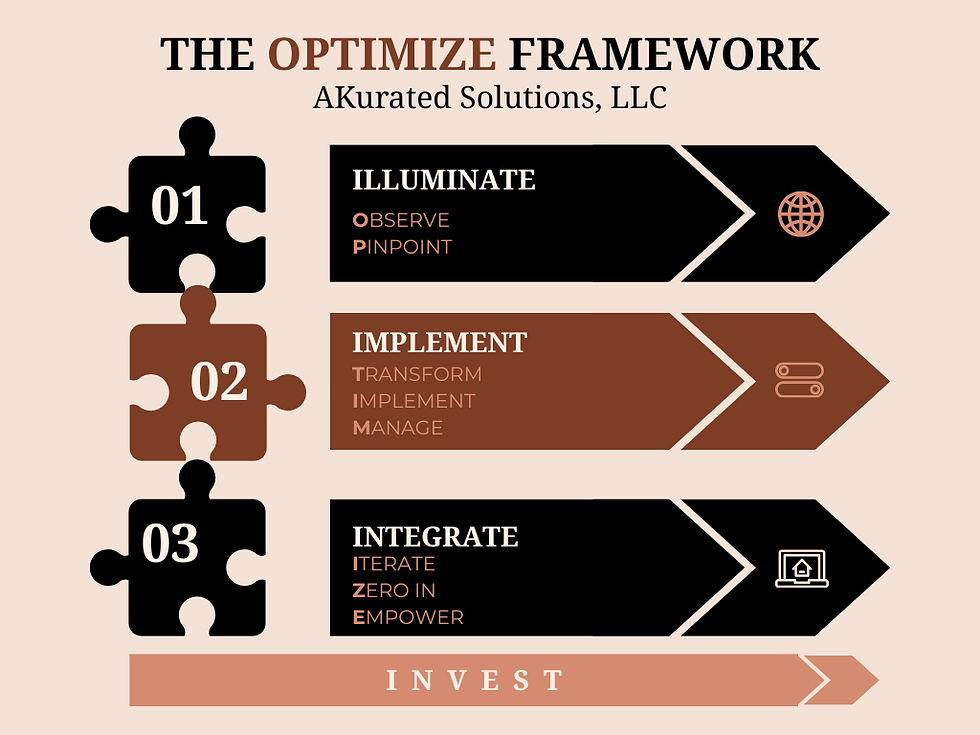
AKurated Solutions helps agencies execute all of the above through our hands-on consulting and our proprietary OPTIMIZE framework. By focusing on people, processes, and technology together, we ensure that implementing a tool like ClickUp genuinely yields the operational clarity and efficiency you’re after.
The bottom line: when you address the root causes – adoption, integration, workflow, and training – your productivity platform can finally live up to its promise.
By understanding why productivity tools fall short and taking strategic action to fix those gaps, you can turn a faltering implementation into a thriving, optimized workflow. It’s not magic – it’s about combining the right tool with the right process and culture. Address the human factors and process issues, and you’ll start seeing the productivity needle move in the right direction.
The payoff is huge: not only better ROI on your software investment, but a smoother-running operation where your team can focus on great work instead of wrestling with tools. In the next blog, we'll dive deep into workflow optimization – and how to spot the signs your team might need a tune-up.
Take the first step toward lasting productivity gains— schedule your OPTIMIZE Intro Call now.
Comments